Multidimensional models#
Fitting is not limited to 1D models. The following example demonstrates how to fit a 2D Gaussian peak to a 2D DataArray.
import numpy as np
import xarray as xr
import matplotlib.pyplot as plt
import lmfit
import xarray_lmfit
# Generate synthetic 2D data
x = np.linspace(-10, 10, 50)
y = np.linspace(-10, 10, 50)
x_arr = xr.DataArray(x, dims=("x",), coords={"x": x})
y_arr = xr.DataArray(y, dims=("y",), coords={"y": y})
z_arr = lmfit.lineshapes.gaussian2d(
    x_arr,
    y_arr,
    amplitude=4.0,
    centerx=0.0,
    centery=0.0,
    sigmax=1.0,
    sigmay=2.0,
).rename("z")

# Add some noise with fixed seed for reproducibility
rng = np.random.default_rng(5)
z_arr = z_arr.copy(data=rng.normal(z_arr, 0.01))
Fitting a 2D model is as simple as providing multiple coordinate names for different independent variables:
model = lmfit.models.Gaussian2dModel()

result_ds = z_arr.xlm.modelfit(
    ("x", "y"),
    model=model,
    params=model.make_params(
        amplitude=2.0, centerx=0.0, centery=0.0, sigmax=1.0, sigmay=2.0
    ),
)
result_ds
<xarray.Dataset> Size: 43kB
Dimensions:                (param: 8, cov_i: 8, cov_j: 8, fit_stat: 9, x: 50,
                            y: 50)
Coordinates:
  * x                      (x) float64 400B -10.0 -9.592 -9.184 ... 9.592 10.0
  * y                      (y) float64 400B -10.0 -9.592 -9.184 ... 9.592 10.0
  * param                  (param) <U9 288B 'amplitude' 'centerx' ... 'height'
  * fit_stat               (fit_stat) <U8 288B 'nfev' 'nvarys' ... 'rsquared'
  * cov_i                  (cov_i) <U9 288B 'amplitude' 'centerx' ... 'height'
  * cov_j                  (cov_j) <U9 288B 'amplitude' 'centerx' ... 'height'
Data variables:
    modelfit_results       object 8B <lmfit.model.ModelResult object at 0x73d...
    modelfit_coefficients  (param) float64 64B 4.065 -0.006079 ... 4.778 0.3158
    modelfit_stderr        (param) float64 64B 0.02927 0.00727 ... 0.002274
    modelfit_covariance    (cov_i, cov_j) float64 512B 0.0008566 ... nan
    modelfit_stats         (fit_stat) float64 72B 25.0 5.0 ... -2.3e+04 0.9355
    modelfit_data          (x, y) float64 20kB -0.008019 -0.01324 ... 0.001742
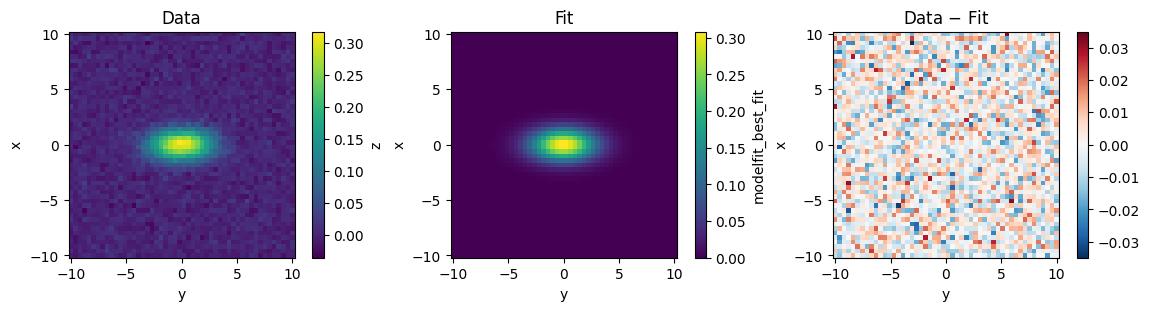
modelfit_best_fit (x, y) float64 20kB 9.16e-28 2.416e-27 ... 7.671e-28Let’s take a look at the best fit and residuals:
fig, axs = plt.subplots(1, 3, figsize=(12, 3), layout="compressed")

z_arr.plot(ax=axs[0], center=False)
axs[0].set_title("Data")

result_ds.modelfit_best_fit.plot(ax=axs[1])
axs[1].set_title("Fit")

(z_arr - result_ds.modelfit_best_fit).plot(ax=axs[2])
axs[2].set_title("Data $-$ Fit")

for ax in axs:
    ax.set_aspect("equal")