Curve fitting with lmfit#
In this section, we will cover basic curve fitting using lmfit for reference purposes. For detailed information, please refer to the lmfit documentation.
If you are already familiar with lmfit, you can skip to the next section.
import matplotlib.pyplot as plt
import numpy as np
import xarray as xr
Let’s start by defining a model function and the data to fit.
def poly1(x, a, b):
    return a * x + b


# Generate some toy data
x = np.linspace(0, 10, 20)
y = poly1(x, 1, 2)

# Add some noise with fixed seed for reproducibility
rng = np.random.default_rng(1)
yerr = np.full_like(x, 0.5)
y = rng.normal(y, yerr)
Models#
A lmfit model can be created by calling lmfit.Model with the model function and the independent variable(s) as arguments.
import lmfit

model = lmfit.Model(poly1)
params = model.make_params(a=1.0, b=2.0)
result = model.fit(y, x=x, params=params, weights=1 / yerr)

result.plot()
result
Fit Result
Model: Model(poly1)
| fitting method | leastsq |
| # function evals | 7 |
| # data points | 20 |
| # variables | 2 |
| chi-square | 5.86642273 |
| reduced chi-square | 0.32591237 |
| Akaike info crit. | -20.5297448 |
| Bayesian info crit. | -18.5382803 |
| R-squared | 0.99155992 |
| name | value | standard error | relative error | initial value | min | max | vary |
|---|---|---|---|---|---|---|---|
| a | 0.96713173 | 0.02103116 | (2.17%) | 1.0 | -inf | inf | True |
| b | 2.18308498 | 0.12301076 | (5.63%) | 2.0 | -inf | inf | True |
| Parameter1 | Parameter 2 | Correlation |
|---|---|---|
| a | b | -0.8549 |
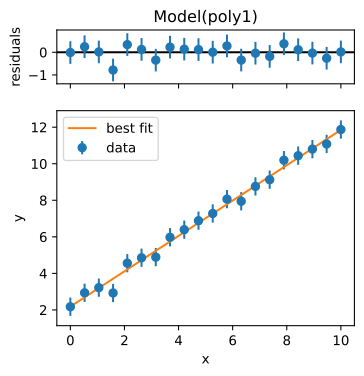
By passing dictionaries to make_params, we can set the initial values of the parameters and also set the bounds for the parameters.
model = lmfit.Model(poly1)
params = model.make_params(
    a={"value": 1.0, "min": 0.0},
    b={"value": 2.0, "vary": False},
)
result = model.fit(y, x=x, params=params, weights=1 / yerr)
_ = result.plot()
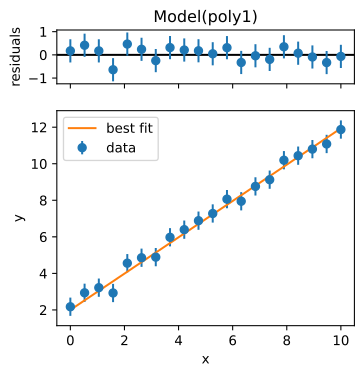
result is a lmfit.model.ModelResult object that contains the results of the
fit. The best-fit parameters can be accessed through the result.params attribute.
Note
Since all weights are the same in this case, it has little effect on the fit results. However, if we are confident that we have a good estimate of yerr, we can pass scale_covar=True to the fit method to obtain accurate uncertainties.
result.params
| name | value | standard error | relative error | initial value | min | max | vary |
|---|---|---|---|---|---|---|---|
| a | 0.99389030 | 0.01125608 | (1.13%) | 1.0 | 0.00000000 | inf | True |
| b | 2.00000000 | 0.00000000 | (0.00%) | 2.0 | -inf | inf | False |
result.params["a"].value, result.params["a"].stderr
(0.9938903037183116, 0.011256084507121714)
The parameters can also be retrieved in a form that allows easy error propagation calculation, enabled by the uncertainties package.
a_uvar = result.uvars["a"]
print(a_uvar)
print(a_uvar**2)
0.994+/-0.011
0.988+/-0.022
Composite models#
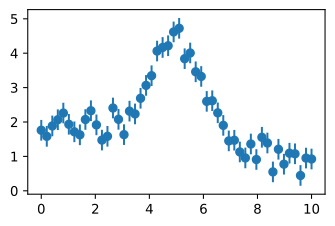
Before fitting, let us generate a Gaussian peak on a linear background.
# Generate toy data
x = np.linspace(0, 10, 50)
y = -0.1 * x + 2 + 3 * np.exp(-((x - 5) ** 2) / (2 * 1**2))

# Add some noise with fixed seed for reproducibility
rng = np.random.default_rng(5)
yerr = np.full_like(x, 0.3)
y = rng.normal(y, yerr)

# Plot the data
plt.errorbar(x, y, yerr, fmt="o")
<ErrorbarContainer object of 3 artists>
A composite model can be created by adding multiple models together.
from lmfit.models import GaussianModel, LinearModel

model = GaussianModel() + LinearModel()
params = model.make_params(slope=-0.1, center=5.0, sigma={"value": 0.1, "min": 0})
params
| name | value | initial value | min | max | vary | expression |
|---|---|---|---|---|---|---|
| amplitude | 1.00000000 | None | -inf | inf | True | |
| center | 5.00000000 | 5.0 | -inf | inf | True | |
| sigma | 0.10000000 | 0.1 | 0.00000000 | inf | True | |
| slope | -0.10000000 | -0.1 | -inf | inf | True | |
| intercept | 0.00000000 | None | -inf | inf | True | |
| fwhm | 0.23548200 | None | -inf | inf | False | 2.3548200*sigma |
| height | 3.98942300 | None | -inf | inf | False | 0.3989423*amplitude/max(1e-15, sigma) |
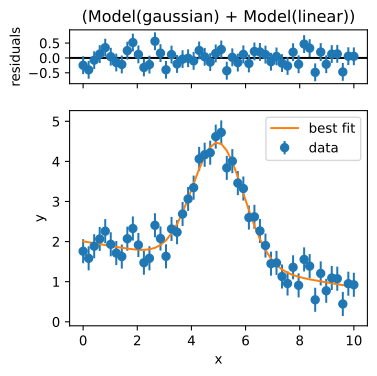
result = model.fit(y, x=x, params=params, weights=1 / yerr)
result.plot()
result
Fit Result
Model: (Model(gaussian) + Model(linear))
| fitting method | leastsq |
| # function evals | 43 |
| # data points | 50 |
| # variables | 5 |
| chi-square | 35.1640791 |
| reduced chi-square | 0.78142398 |
| Akaike info crit. | -7.59989616 |
| Bayesian info crit. | 1.96021887 |
| R-squared | 0.94677517 |
| name | value | standard error | relative error | initial value | min | max | vary | expression |
|---|---|---|---|---|---|---|---|---|
| amplitude | 7.16590435 | 0.37616176 | (5.25%) | 1.0 | -inf | inf | True | |
| center | 4.99152727 | 0.04220625 | (0.85%) | 5.0 | -inf | inf | True | |
| sigma | 0.94300480 | 0.04687009 | (4.97%) | 0.1 | 0.00000000 | inf | True | |
| slope | -0.11380431 | 0.01318512 | (11.59%) | -0.1 | -inf | inf | True | |
| intercept | 2.00633810 | 0.08441486 | (4.21%) | 0.0 | -inf | inf | True | |
| fwhm | 2.22060656 | 0.11037063 | (4.97%) | 0.23548200000000002 | -inf | inf | False | 2.3548200*sigma |
| height | 3.03156714 | 0.11942779 | (3.94%) | 3.989423 | -inf | inf | False | 0.3989423*amplitude/max(1e-15, sigma) |
| Parameter1 | Parameter 2 | Correlation |
|---|---|---|
| slope | intercept | -0.7822 |
| amplitude | sigma | +0.7041 |
| amplitude | intercept | -0.4390 |
| sigma | intercept | -0.3091 |
| center | slope | -0.2592 |
| center | intercept | +0.2027 |
How about multiple gaussian peaks? Since the parameter names overlap between the models, we must use the prefix argument to distinguish between them.
model = GaussianModel(prefix="p0_") + GaussianModel(prefix="p1_") + LinearModel()
model.make_params()
| name | value | initial value | min | max | vary | expression |
|---|---|---|---|---|---|---|
| p0_amplitude | 1.00000000 | None | -inf | inf | True | |
| p0_center | 0.00000000 | None | -inf | inf | True | |
| p0_sigma | 1.00000000 | None | 0.00000000 | inf | True | |
| p1_amplitude | 1.00000000 | None | -inf | inf | True | |
| p1_center | 0.00000000 | None | -inf | inf | True | |
| p1_sigma | 1.00000000 | None | 0.00000000 | inf | True | |
| slope | 1.00000000 | None | -inf | inf | True | |
| intercept | 0.00000000 | None | -inf | inf | True | |
| p0_fwhm | 2.35482000 | None | -inf | inf | False | 2.3548200*p0_sigma |
| p0_height | 0.39894230 | None | -inf | inf | False | 0.3989423*p0_amplitude/max(1e-15, p0_sigma) |
| p1_fwhm | 2.35482000 | None | -inf | inf | False | 2.3548200*p1_sigma |
| p1_height | 0.39894230 | None | -inf | inf | False | 0.3989423*p1_amplitude/max(1e-15, p1_sigma) |
For more information, see the lmfit documentation.